Smart presets
Save your tabs and focus settings, then open the right workspace with one click.

From deep work to exam prep, Tenvilo keeps your browser focused when it matters.

@maya_builds
Finally, a focus tool that works where I do — in the browser. My deep-work sessions are much easier to protect.

@arivera
I start a session, the right tabs open, and the timer runs. No extra app to manage.

@sofiapark
Exam prep without endless feeds. I kept only the sites I needed and finished the chapter that evening.

@noahblake
Streaks and session statistics without spreadsheets. Simple, unobtrusive, and reliable.

@lena_o
Client work and side projects no longer blur together. One goal, one workspace.

@jokonkwo
The gentlest blocker I've used. Distractions can wait; the work can't.

@priyanair
I set it up once, and every workday starts the same way: choose a goal, start a session, get to work.

@tomadler
It doesn't feel like another productivity app. It simply makes the browser easier to work in.

@yuki_t
Presets for studying and client work save me time. I can switch contexts without reopening a mess of tabs.

@omarh
My progress updates automatically, so I can see whether I am actually staying consistent.

@ellabrooks
Gentle blocking, noticeable results. YouTube can wait; the draft cannot.

@kaimendes
Three steps, and the workspace is ready. It really is as simple as promised.
Sessions, streaks, focus windows, and next actions stay together in one clear Tenvilo view.
Open analytics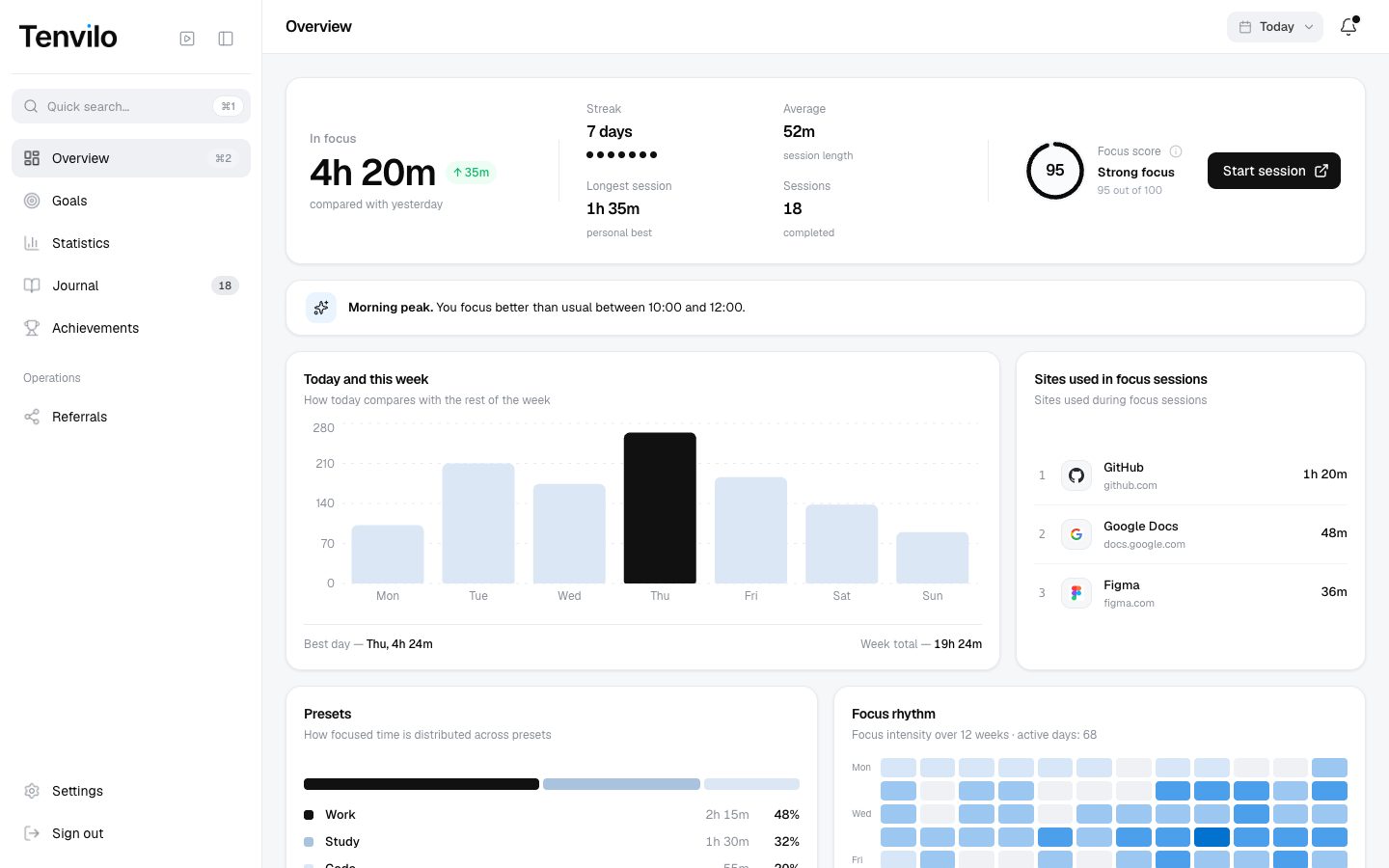
Save your tabs and focus settings, then open the right workspace with one click.
Get useful updates about completed sessions, breaks, and important workspace activity.
Connect Tenvilo to the tools you already use. Google Calendar access is optional and helps plan focus sessions around your schedule.
Tenvilo keeps distracting sites out of the way while you work on the task you chose.
Students, developers, freelancers, and anyone who works in a browser need the same thing: a workspace that supports the goal instead of pulling them away from it.
Keep course pages, documents, and research open while blocking the usual distractions.
Protect long coding sessions from random tabs, messages, and endless research loops.
Keep one client context open at a time and switch without losing your place.
Turn a cluttered browser into a reusable workspace for focused work.
Tenvilo helps you start sessions, track progress, and return to your work without rebuilding your setup.
Add to ChromeTenvilo uses site addresses and domains when they are needed for focus sessions, presets, blocking, and activity statistics. It does not read or store the contents of the pages you open.
The free version includes the core focus tools: focus sessions, workspaces and presets, basic statistics and streaks, local data storage, and export/import. Premium adds the extended features shown on the pricing page.
Yes. You can pause or end a focus session at any time. Tenvilo records the time you actually spent focused, so you are not locked into the original timer.
You stay in control. Pause or end the focus session and normal browser access returns; Tenvilo does not lock you out of your browser.
Google Calendar connection is optional. When connected, Tenvilo reads events from your primary calendar to help plan focus sessions. If you manage calendar events through Tenvilo, it can create, update, or delete those events. See our Privacy Policy.
Yes. You can start with the core focus features without signing in. An account is needed for account-based features such as sync, your profile, and the web dashboard.